


 Unlock the full potential of your mobile device! This App allows users of the Cloud Hybrid to access the digital content stored on their network drive through an iPhone, iPod Touch, iPad or Android based mobile device. Open the App and gain access to your music, videos and photo libraries.
Files can be uploaded from the mobile device to the network drive or stored directly on the network drive at the time the image or note is captured. Documents and media files that are stored on the network drive can be accessed and viewed on the mobile device.
Having access to the Cloud Hybrid from a mobile device means that the devices are no longer limited to their internal storage capacity. Cloud Hybrid turns a 16GB iPhone into a 1TB iPhone. It also means that users can enjoy music, photos and video files on the phone without having to actually store the files on the mobile device.
Features
- Remote login works straight out of the box
- Upload manager to upload files to the remote network drive
- File browser to access files on the remote network drive
- Camera function to capture and instantly upload photos
- Voice memo to record and instantly upload voice recordings
This app has been discontinued and is no longer available for download.
Applications
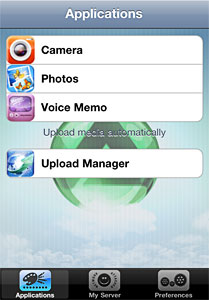 Applications provide extra functionality for your mobile device to easily interact with the remote network drive at your home.
Camera
Take a picture and the photo will be stored on the network drive automatically.
Photos
Access your photo albums and saved photos on your mobile device, select any picture you like to upload, tap on it and it will store the picture on the network drive.
Voice Memo
Record a voice message and the audio file will be stored on the network drive automatically.
Upload Manager
Monitor the upload status of your files.
My Server
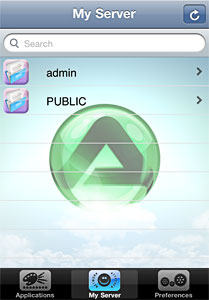 The file browser allows you to access the network drive and view the files by folder list, just like when the network drive is mounted on a computer.
Select a media file (e.g. JPG photo or MP4 video), tab on it and you can view it directly in your mobile device. You can go through your files manually or you can start a slideshow.
If you like to share a certain file with your friends, simply click on Share, fill out the e-mail address and an invitation will be sent to your friends. They can click on the link and log on to your media server to view the files.
Note:
The files are all stored on the hard drive of the network drive and will not take up any space on the mobile device. However, to view the files, an internet connection is required.
Preferences
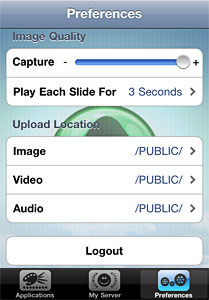 Configure the application according to your own preferences.
Capture
Set the quality for the captured images.
Slideshow
Set the interval time for the slideshow.
Upload Location
Define the path on the media server where the app stores the files. By default, the files are stored in their corresponding folders (e.g. images under photos), making it easy to find no matter if you use your mobile device, a web browser or a file browser on your computer.
Logout
Logout from your network drive and quit the app.
Frequently Asked Questions
Which products are supported?
This application supports the Cloud Hybrid of our network attached storage devices.
Where can I download this application?
This app has been discontinued and is no longer available for download.
Do I need to setup anything special in order to remotely log on to my network drive?
No, remote access is supported out of the box and there is no need to modify any settings on the network switch or router. However, we recommend to register your network drive and select a device name that is easy to remember. That way, you don't have to memorize the MAC address and can use a simple name to log on.